5 Best AI Tools for Brand Management in 2026 (Tested)

The brand guidelines are solid. The design team is talented. And somewhere between the approved template and what a regional sales rep sent out last Tuesday, things went sideways. Perhaps a wrong logo, outdated disclaimer, or a font no one approved.
Each misstep chips away at the customer experience. At scale, those brand inconsistencies add up, widening the gap between what your brand guidelines say and what actually goes out the door. The more people who create content across your organization, the wider that gap gets.
AI-driven tools for brand management are now built to close that gap by enforcing brand standards at the exact moment distributed teams create audience-facing content.
Here’s how the leading platforms stack up.
Top 5 AI tools for brand management: Quick comparison
Before comparing platforms, it helps to know that “AI for brand management” means three different things depending on who’s using the phrase.
Some tools use AI to monitor how your brand appears across social channels and AI search engines. Others use it to generate logos, visual identities, and brand assets from scratch.
The tools in this guide do something different: they use AI to govern how content gets created across distributed teams, enforcing brand standards at the moment of production, not after the fact. If your problem is brand drift across 50 locations, 200 agents, or a franchise network, that’s the category that matters. The comparison below evaluates each platform on exactly that dimension.
| Name | Best For… | AI Capabilities | Governance Level |
| Marq | AI-powered brand governance for distributed teams with compliance requirements | Brand Guardian scores content in real time against brand rulesAI Marqet triggers automated content generation from business eventsSmart fields auto-populate templates from CRM and data sources | High with locked templates, approval workflows, role-based publishing |
| Templafy | Document-level AI compliance inside Microsoft Office | Smart document automation with dynamic fieldsAuto-populated disclaimersConditional logic for correct content based on document type or user role | High but limited to Microsoft Office environment |
| CHILI Publish | Developer-led AI rendering for high-volume print and digital production | Variable data rendering engine GraFx Studio for complex template logic for print, digital, and animated output | High but requires developer resources to configure and maintain |
| Canva Enterprise | Fast AI-assisted content creation for everyday digital assets | Magic Studio for AI-assisted functions such as:Text-to-image generationBackground removalLayout suggestionsContent repurposing | Medium with brand kits and limited locking; relies more on user discipline |
| Adobe Express | AI-powered creation for teams already in the Adobe ecosystem | Firefly AI for content-aware editingCreative Cloud Libraries sync brand assets automatically | Medium as brand assets flow in from Creative Cloud, but no locked fields or approval workflows |
If brand consistency is non-negotiable and your distributed team creates content across multiple locations, roles, or business units, Marq is the only platform that combines governed templates, AI automation, and deep CRM and DAM integration into a single system.
1. Marq: Best for enterprise governance and distributed teams

Marq is a brand templating and content management platform trusted by over 7 million used by over 7 million people across distributed teams where brand accuracy is non-negotiable and digital brand governance is a core requirement.
If your organization looks anything like these:
- Real estate brokerages where 500 agents each need personalized listing materials
- Financial services firms where compliance language must be identical across every client-facing document
- University systems where 40 departments all create their own collateral
Marq is built for exactly that.
Key features
Where most tools put creation speed first, Marq focuses on governance. AI runs inside these guardrails.
1. Template governance with role-based controls
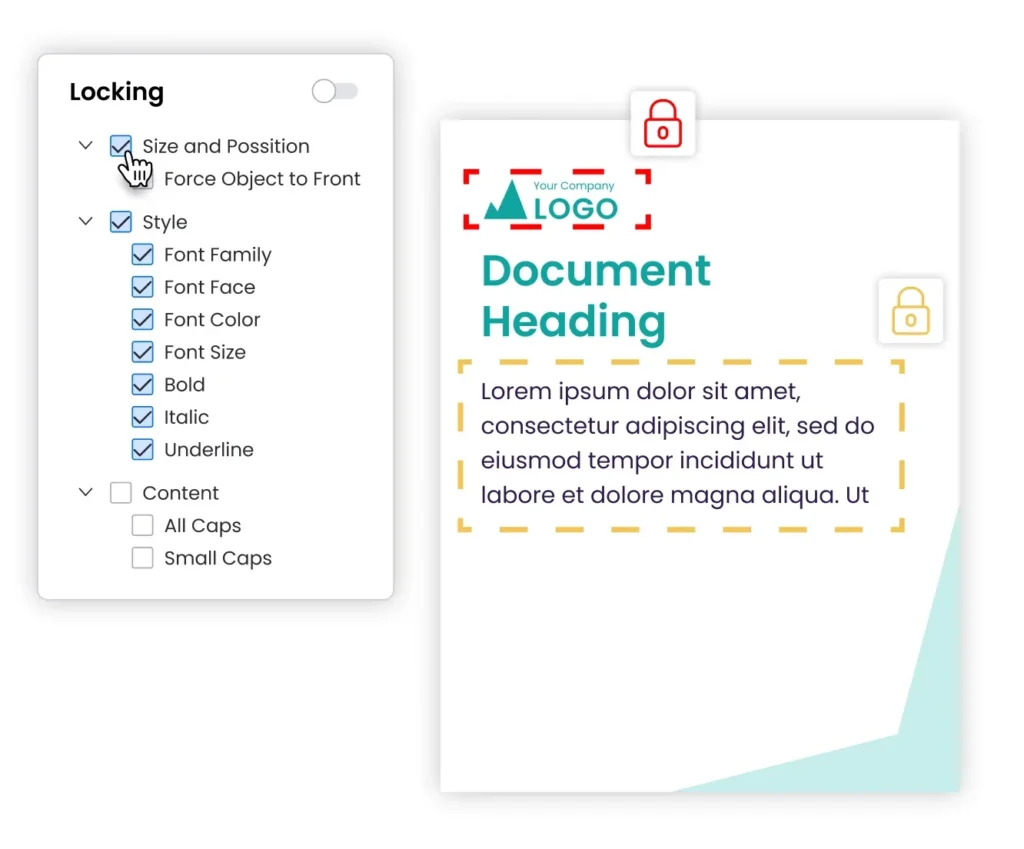
Marq’s governance layer lets admins lock specific template elements while leaving designated zones editable for field teams. Role-based permissions determine who can access, customize, and publish each template type. A regional financial advisor can update their contact details and headshot but cannot touch the compliance language, brand colors, or brand imagery.
With Marq, governance happens by design, not trust. This means global brand updates push across every template the moment they’re made centrally, a critical advantage when managing a global brand, preventing version drift and rogue edits. Locked templates are also what makes automation trustworthy. Content can be generated at scale because the brand rules are already built in.
2. Brand Guardian: AI spell-check for your brand
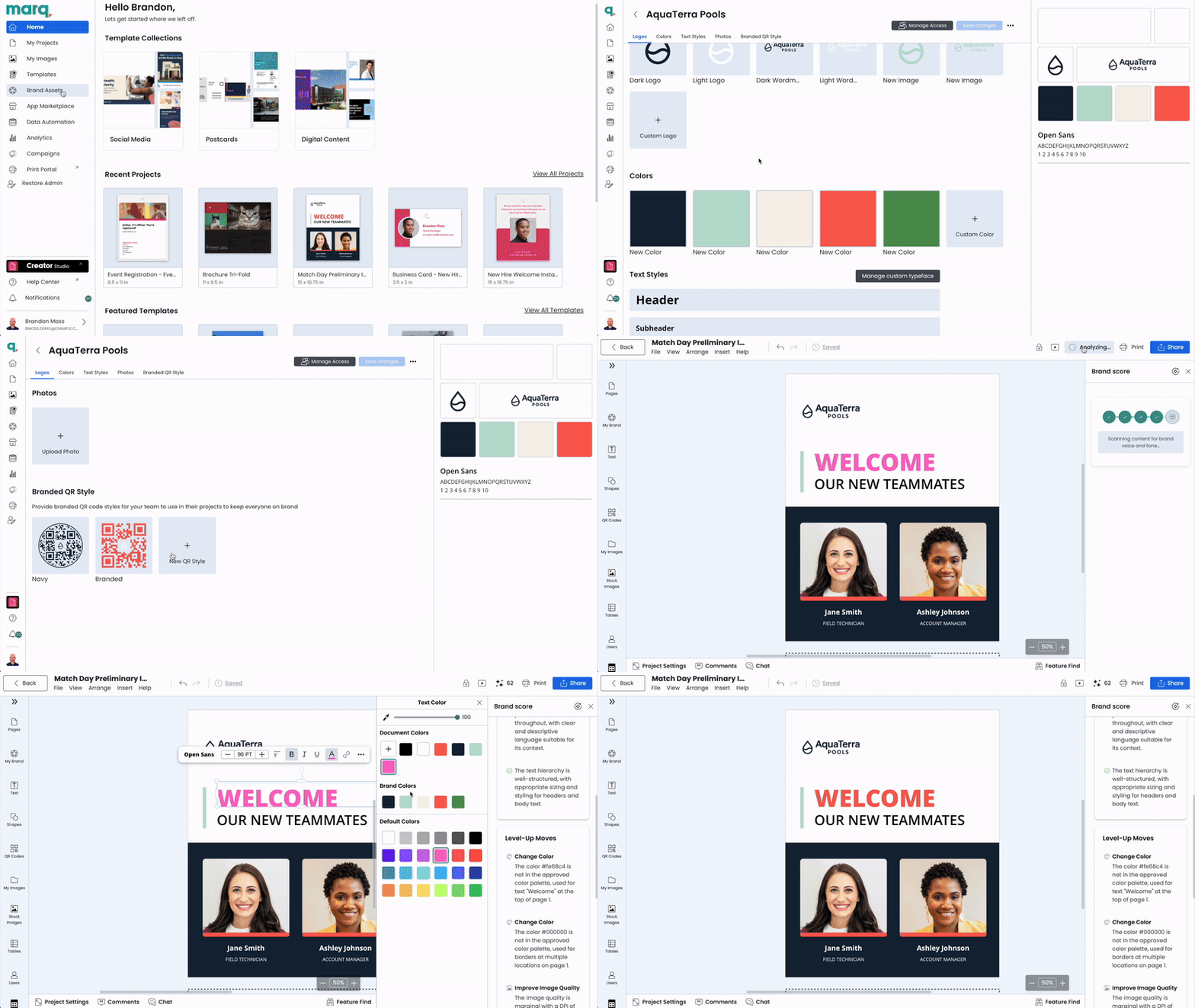
Brand Guardian is Marq’s built-in AI that reviews content as it’s being created.
Brand rules are set up by team, location, or brand through Marq’s portal system, and Brand Guardian enforces them in real time as creators work. It checks logo usage, fonts, colors, imagery, and tone before anything goes to review. Creators get a brand score and see specific flags they can address on the spot.
The score is a great indicator of being able to minimize or eliminate the need for manual approval.
The practical effect: brand errors get caught before they leave the creator’s hands, not after a designer has to chase them down. For distributed teams where review capacity is limited, this is the difference between a brand governance system that scales and one that depends on catching mistakes after the fact.
3. Creative automation
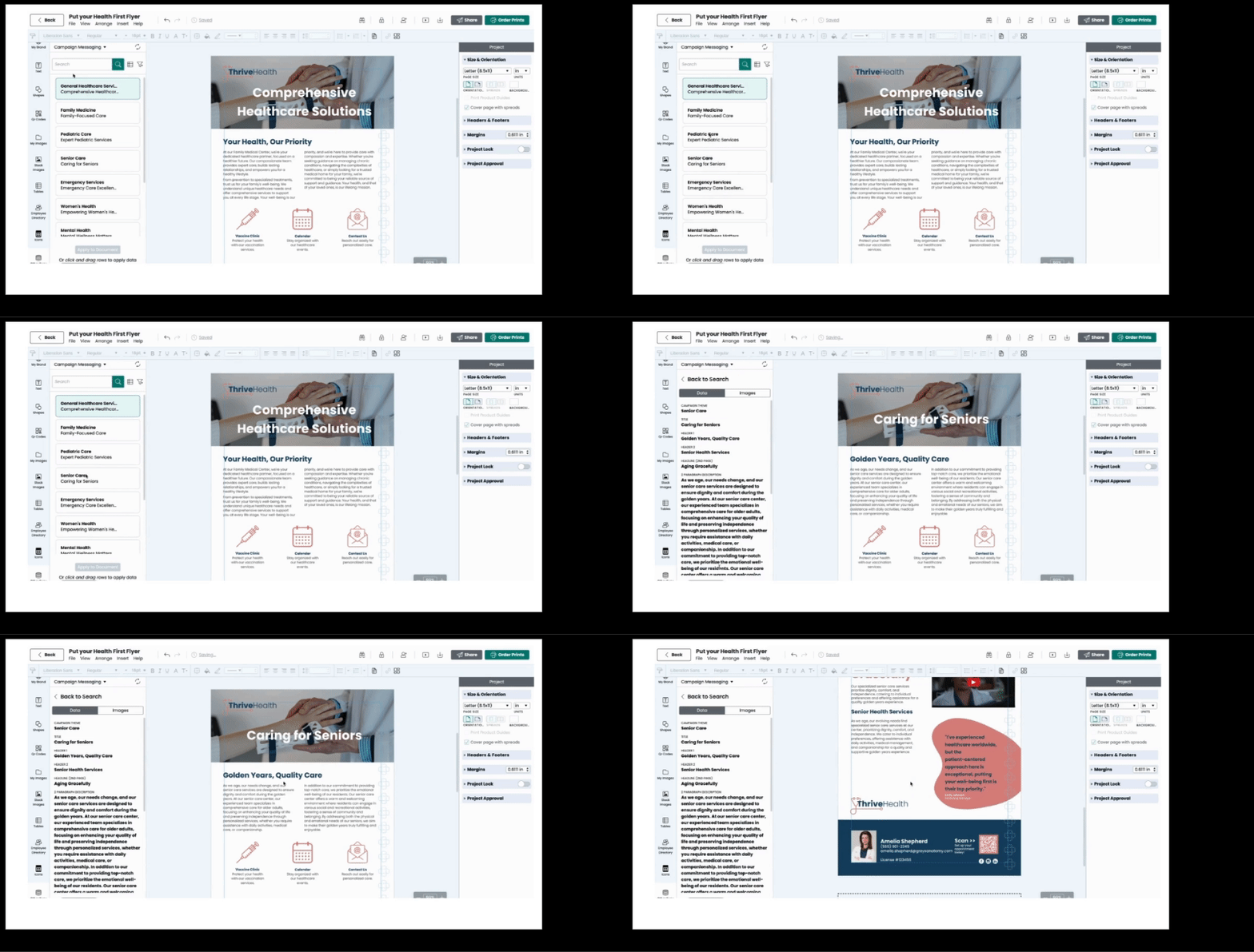
Creative automation is how Marq eliminates the manual work inside templates. Instead of recreating assets from scratch or copy-pasting data across files, teams use creative automation tools like Marq to connect their data sources to templates once; Marq handles the rest.
- Standard smart fields: Templates auto-populate with profile data (name, title, headshot, contact info). Org-wide smart fields handle shared details like approved taglines or company contact information, updated once and reflected everywhere.
- Custom smart fields: Connect any dataset via CSV, Google Sheets, XML, or MLS feed and link it to fields inside a template. When the data changes, the template reflects it. Useful for spec sheets, proposals, rate tables, and any material that varies by location, product, or listing.
- Formulas: Excel-like calculations run directly inside text boxes, shapes, or table cells — keeping pricing, rates, and calculated values accurate across assets without manual edits.
4. AI Marqet: event-driven content automation
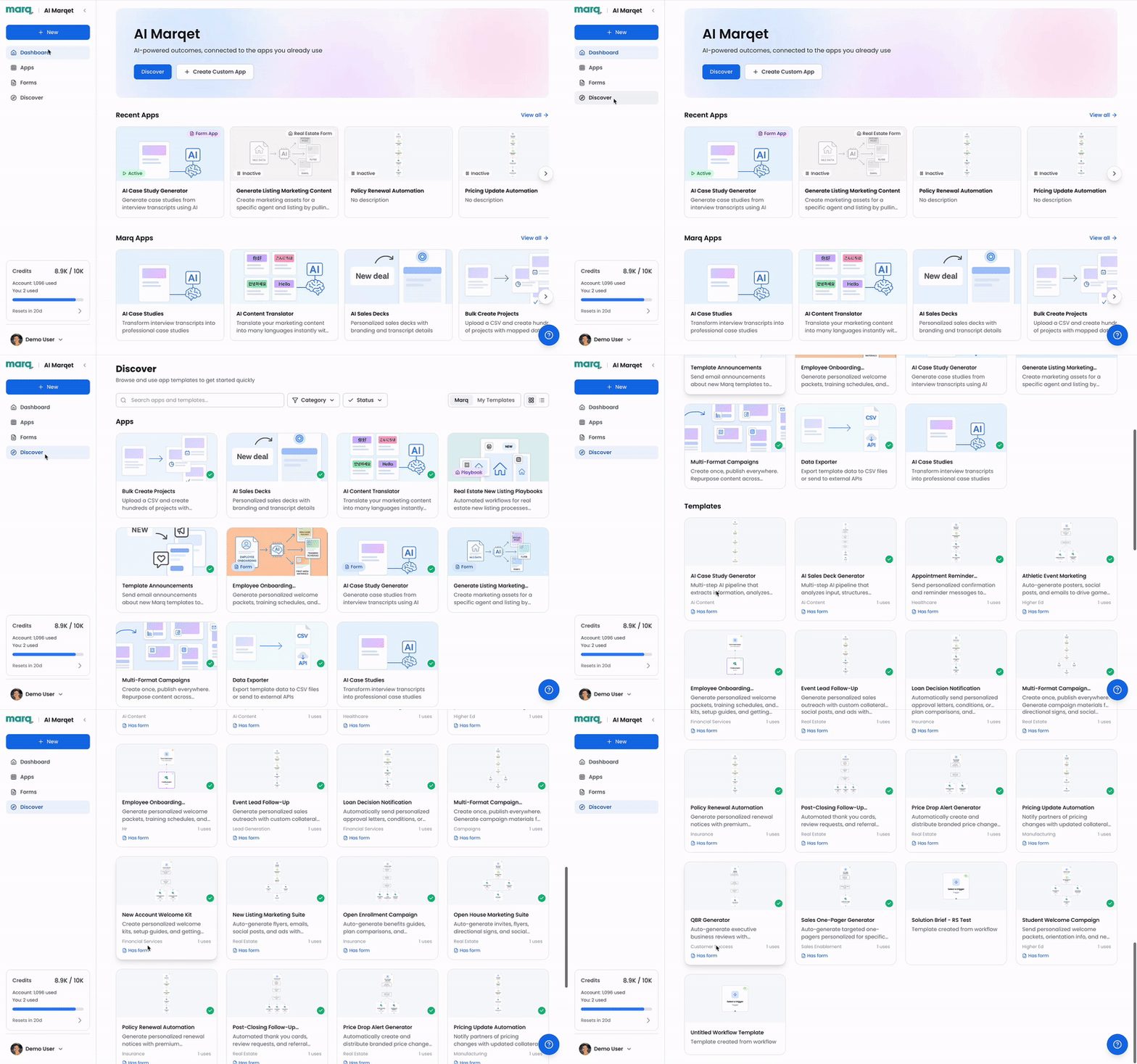
AI Marqet extends creative automation from something that happens when someone opens a template to something that happens automatically. Content automation is triggered by a business event, with no manual work required.
A new property gets listed. A deal moves to the proposal stage. A campaign launches. Marq detects the trigger, pulls the relevant data, generates the content, and routes it to the right person’s inbox without anyone filing a request.
Apps include:
- Real estate Playbooks that automatically trigger a pre-configured content generation package: multiple templates, filled with live data, delivered to the right person’s inbox.
- Content Translator for instant localization across languages while preserving brand voice (See it in action)
- Sales Presentations Creator that generates branded decks from a guided form intake
These are all automation capabilities built to run inside the governance framework an organization already has.
Pricing
Contact Marq’s enterprise sales team for a custom quote based on your organization’s scale and requirements.
Where Marq shines
- Distributed teams with compliance requirements: Financial services, insurance, healthcare, and real estate organizations where regulatory requirements make off-brand or non-compliant content a legal liability. Marq’s governance-first architecture is built for exactly this, serving as a secure distributed marketing platform that legal and marketing teams can trust.
- High-volume personalized content: When hundreds of field reps each need localized, customized materials, AI Marqet, and data merge eliminate the production bottleneck entirely.
- Multi-brand and franchise organizations: Corporate controls the guardrails; local teams work within them.
- Teams with existing DAM or CRM investment: Marq activates those systems for better brand enablement and content creation in ways standalone tools cannot.
Where Marq falls short
- Small teams without distributed creators: If content requests are easily managed by a small in-house team who don’t serve many other departments, Marq’s governance infrastructure may be more than you currently need.
- Pixel-perfect creative work: Marq is built for governed, repeatable content. For highly custom, one-off design projects, a full Adobe workflow remains the better fit.
Customer reviews
Julie Cumby, a Marketing Director at Berkshire Hathaway HomeServices, says, “Marq has allowed us to stay in control of our brand — maintaining compliance across all our agents and marketing pieces, whether they’re printed or distributed digitally.”
Chrissy Kincheloe, another Marketing Director at Berkshire Hathaway, adds, “The ability to take our creative files, load them into Marq, and allow our agents to customize the templates themselves has been absolutely wonderful and really takes a load off my marketing team.”
Tony Mordaunt, Marketing Manager at Property Brokers, said, “There’s a huge risk for brand going forward into the AI space. Having a platform like Marq, where you can still access [AI] tools in the confines of your brand, and still make sure that everything that’s going out speaks to our story and looks amazing – that’s key.”
Who Marq is best for
- Distributed organizations at scale: Companies with 100+ employees especially across real estate, financial services, and higher education where field teams, partners, and regional contributors create content independently and brand standards can’t afford to slip.
- Lean creative teams under pressure: Marketing and creative teams responsible for enabling a large volume of contributors who need to say “yes” more often without becoming a quality control bottleneck every time a rep needs a flyer.
- Organizations where governance isn’t optional: Companies that need built-in approval workflows, including marketing approval workflows, locked templates, brand controls and AI to manage compliance risk as content volume grows.
| Check out Marq’s complete guide to digital brand management and support your enterprise at scale. |
2. Templafy: Best for compliance-heavy Microsoft Office environments

Templafy is a document automation and brand governance platform built specifically for organizations where brand risk lives inside Word documents, PowerPoint decks, and Outlook emails. It integrates directly with Microsoft Office to enforce templates, brand elements, and compliance language at the point of creation.
Its primary audience is teams where the concern is less about creative drift and more about document-level compliance. Templafy solves that problem well inside the Microsoft ecosystem. Outside of it, its reach is limited.
Key features
- Microsoft Office integration: Templates, brand kits, and compliance content surface directly inside Word, PowerPoint, and Outlook with no platform switching required.
- Smart document automation: Dynamic fields, auto-populated disclaimers, and conditional logic that enforces correct content based on document type or user role.
- Compliance controls: Ensures approved legal language and brand elements are applied consistently across enterprise documents.
- Content library: Centralized storage for approved slides, clauses, email signatures, and brand assets accessible from inside Office apps.
Pricing
Templafy is priced on a quote basis and has been flagged in user reviews as expensive relative to value for organizations under ~500 users.
Where Templafy shines
- Microsoft-native organizations: Organizations where brand risk lives in Word and PowerPoint documents will find Templafy fits their existing workflows without disruption.
- Compliance-intensive industries: Financial services, professional services, and legal teams benefit from Templafy’s document-level enforcement and audit capabilities.
- Enterprise document governance: Strong at ensuring legal clauses, disclaimers, and brand elements are consistently applied across high-stakes internal and external documents.
Where Templafy falls short
- Limited to Microsoft formats: Templafy governs Word and PowerPoint. For teams creating social content, print collateral, email campaigns, or any digital asset outside Office, it doesn’t apply.
- Complex onboarding: Users cite a steep learning curve and clunky UI that requires significant training before teams are productive.
- Pricing pressure at mid-market scale: Organizations with 200 to 500 users report the pricing model becoming unfavorable, with add-ons creating friction.
Customer reviews
Luis H. says, “Our team uses Templafy every day and for multiple use like Word and PowerPoint proposal template building.”
However, Shantanu C. notes, “I think the app would benefit from having more AI-powered features integrated into its search function.”
Who is Templafy best for
- Enterprise legal, compliance, and IT teams in financial services, professional services, or accounting where document governance inside Microsoft Office is the primary need
- Organizations where the brand risk is concentrated in formal documents, not distributed field content
Side Note: See how Marq’s governance approach extends beyond documents into every channel your teams use.
3. CHILI Publish: Best for developer-led, high-volume print and digital production
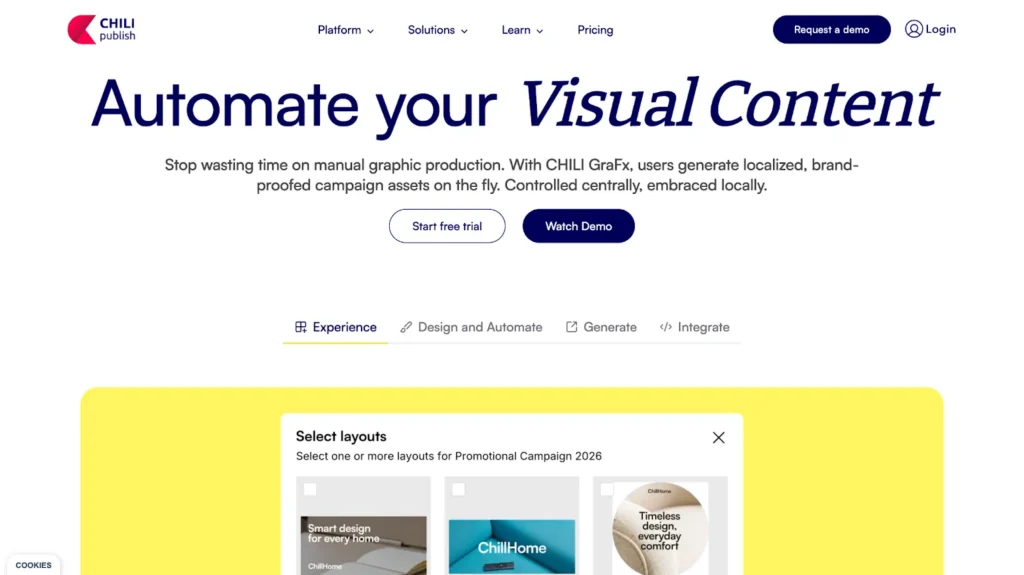
CHILI Publish is a developer-first creative automation engine designed for organizations with in-house technical teams managing complex, high-volume print and digital template workflows. It offers a powerful variable data rendering engine, strong print prepress output, and an open API architecture that allows deep customization.
The distinction here is important to understand: CHILI is an engine, not a platform. It’s built for teams with dedicated developer resources who can build and maintain custom integrations.
For organizations without dedicated developer resources, the implementation lift is often significant.
Key features
- Variable data rendering engine: Precisely controls how dynamic data maps to template variables across high-volume print and digital outputs.
- Developer toolkit: Full SDK, open-source connectors, and API access give technical teams significant customization depth.
- GraFx suite: CHILI’s modern platform that includes Studio for template creation, Publisher for print, and Insights (in early stages) for analytics.
- Omnichannel output: Supports print, digital, and animated exports from the same template foundation.
Pricing
CHILI’s pricing is quote-based, and dependent on features and templates chosen.
Where CHILI Publish shines
- High-volume print production: Organizations managing millions of print variants with precise prepress requirements and quality-critical output.
- Developer-led environments: Teams with in-house technical resources who want maximum flexibility and custom integration capability.
- Complex variable rendering: Print-heavy industries like packaging, publishing, and retail where template logic is complex and volume is extreme.
Where CHILI Publish falls short
- Non-technical marketing teams: CHILI requires a certain level of developer know-how for setup, integration, and maintenance. Business teams cannot self-serve if they don’t have this support readily available.
- Speed of deployment: Multiple customer accounts describe extended, complex rollouts.
- Approval workflows: CHILI requires external tools to manage review and approval processes with no native workflow management.
Customer reviews
A small business user notes, “It is a very versatile tool which we use to create editable templates for print-on-demand portals.”
Simena B. warns, “If you are used to Photoshop or other design tools, CHILI GraFx may seem not that user-friendly.”
Who is CHILI Publish best for
- Production, operations, and development teams managing high-volume, print-heavy workflows who have the technical resources to build and maintain the integration
- Teams where the main challenge is rendering quality and variable data precision at scale, not distributed self-serve enablement
4. Canva Enterprise: Best for fast, high-volume everyday content

Canva Enterprise is one of the most widely adopted design tools in the market. Its UI is easy to grasp and the learning curve is low.
For teams creating high-volume, lower-stakes content (like social posts, internal decks, or event graphics), Canva reduces turnaround time significantly. Canva’s AI suite (Magic Studio) covers image generation, background removal, AI-assisted design suggestions, and content repurposing.
These tools accelerate creation but what they don’t solve is the problems that crop up when 200 distributed users all have creation access and no hard boundaries on what they can change.
Key features
- Template library: Thousands of pre-built templates for social content, presentations, and other marketing assets.
- Brand kits and template library (often used as lightweight content library software): Logos, colors, and thousands of pre-built templates that guide creators toward on-brand choices, though whether the brand kit is used at scale is heavily dependent on each user’s participation.
- Magic Studio AI: Text-to-image generation, background removal, AI-assisted layout suggestions, and content repurposing tools.
- Collaboration: Real-time co-editing, commenting, and sharing for fast feedback loops.
Pricing
If your team has over 100 users, you need the Canva Enterprise plan, which follows quote-based pricing.
Where Canva shines
- Social media posts and everyday content: High-volume, lower-risk assets where speed is the priority and brand drift is an acceptable tradeoff.
- Speed and ease of adoption: Virtually no learning curve. A new hire can open Canva and publish something today. Whether it looks on-brand tomorrow is a different question.
- Collaboration: Fast, frictionless review cycles for teams that need quicker output times.
Where Canva falls short
- Governance at scale: Template permissions and locking are less granular than platforms built for regulated, distributed environments. Canva Enterprise offers some controls, but they’re easier to bypass when hundreds of users have access.
- CRM-driven personalization: No native smart fields or CRM connectivity for auto-populated, personalized collateral at volume.
- Compliance-sensitive industries: For teams in information-sensitive industries where every piece of content carries legal or compliance risk, Canva’s user-discipline model tends to break down.
Customer reviews
Sujay shares, “Canva solves the problem of creating designs without technical knowledge or expensive software.”
Lokendra adds, “It doesn’t offer the same depth or flexibility as professional tools when working on very detailed or complex projects.”
Who Canva Enterprise is best for
- Marketing teams creating everyday digital content at volume where speed matters more than strict governance
- Businesses with a primarily centralized creative team where distributed brand risk is low
5. Adobe Express: Best for teams already invested in the Adobe ecosystem
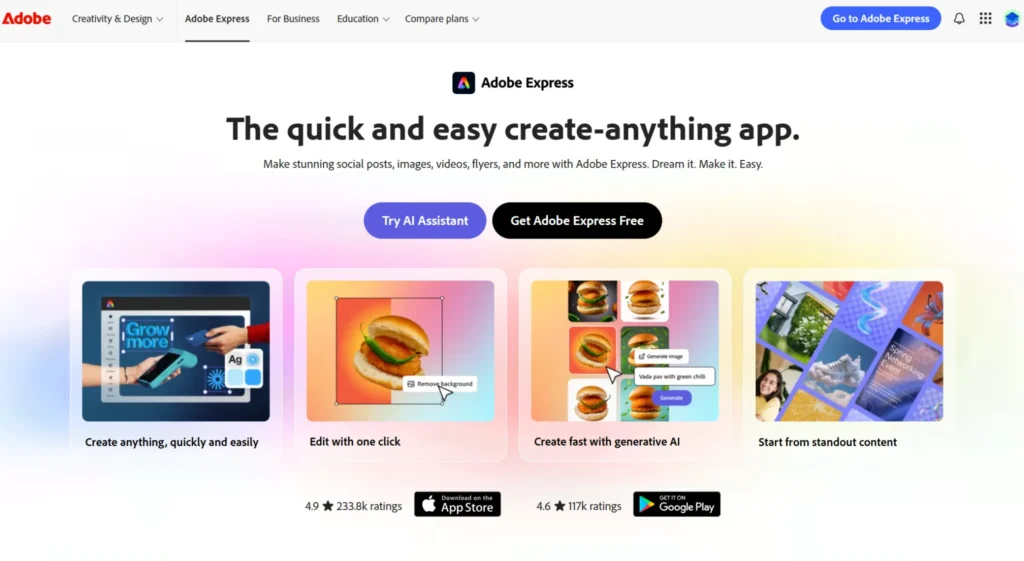
Adobe Express is Adobe’s lightweight design tool built for non-designers who need to create on-brand assets without Photoshop or Illustrator. For organizations already running Creative Cloud (where designers work in InDesign and Illustrator and the rest of the team needs a simpler entry point), Express provides that bridge.
Its Firefly AI integration adds image generation and content editing. Adobe Libraries connectivity means brand assets flow in from Creative Cloud. But like Canva, the platform’s governance depth remains rather limited.
Adobe Express was built with speed and access in mind. Distributed enterprise teams prioritizing role-based control and approval workflows would need more.
Key features
- Adobe Libraries integration: Logos, fonts, colors, and assets from Creative Cloud flow directly into Express, reducing the gap between designer-created assets and everyday team use.
- Firefly AI: Text-to-image generation, generative fill, and content-aware editing built on Adobe’s proprietary AI model.
- Template creation: Lightweight layouts for social, presentations, and basic marketing assets.
- InDesign-to-Express bridge: Designers can create in InDesign and make templates available to teams in Express, a workflow that works well inside Adobe-native organizations.
Pricing
Contact Adobe for enterprise pricing.
→ See how Marq compares as an Adobe Express alternative for distributed enterprise teams.
Where Adobe Express shines
- Adobe-first organizations: Reduces friction for teams already trained on Adobe workflows, with familiar asset access through Creative Cloud.
- Lightweight content from designer-built templates: Works well when designers create the master templates in InDesign and Express is the distribution layer for the rest of the team.
- Adobe-to-field handoff for simple asset types: When the content need is straightforward (an event flyer, a social post, or a one-page leave-behind), Express gets it out the door fast without pulling a designer back in.
Where Adobe Express falls short
- Relies on manual oversight for brand control: Without locked templates and approval workflows, brand consistency depends on user discipline. Someone could change the font or use last year’s logo. Without locked templates, it’s a matter of when.
- Governance and distributed enablement: Lacks the robust permissions, approval workflows, and data-merge capabilities for large, multi-location teams creating content independently.
- No hard stops on brand errors: Express has no mechanism to lock a field, restrict a font, or require approval before something goes out. Teams that need those controls will hit that wall quickly.
Customer reviews
Chardane M. says, “I really appreciate the numerous templates that save me time because I only need to make minimal changes to fit my brand.”
Shruti S. mentions, “For more detailed or custom designs, it doesn’t offer the same level of control as full design tools.”
Who Adobe Express is best for
- Teams already running Creative Cloud that want a lightweight creation layer for non-designers
- Organizations where the primary challenge is giving field teams access to designer-created assets, not governing what they do with them
Side Note: It’s also a popular Microsoft Publisher alternative for marketing teams.
Five things to consider while choosing an AI brand management platform
Selecting the right brand management platform depends on five organizational criteria no feature list will tell you. They all boil down to this question: where is your brand already slipping, and can you afford for that audience to see it when it does?
1. The scale and skill level of your content creators

Teams with a centralized creative function can get by with most tools. Once content creation spreads to sales reps, regional offices, or franchise locations, most tools break down.
If dozens or hundreds of people across teams are creating materials, you need a platform built for distributed enablement with role-based controls.
Canva and Adobe Express lower the barrier to creation, but Marq lowers the barrier while maintaining the guardrails.
2. How brand control is enforced and where it tends to break
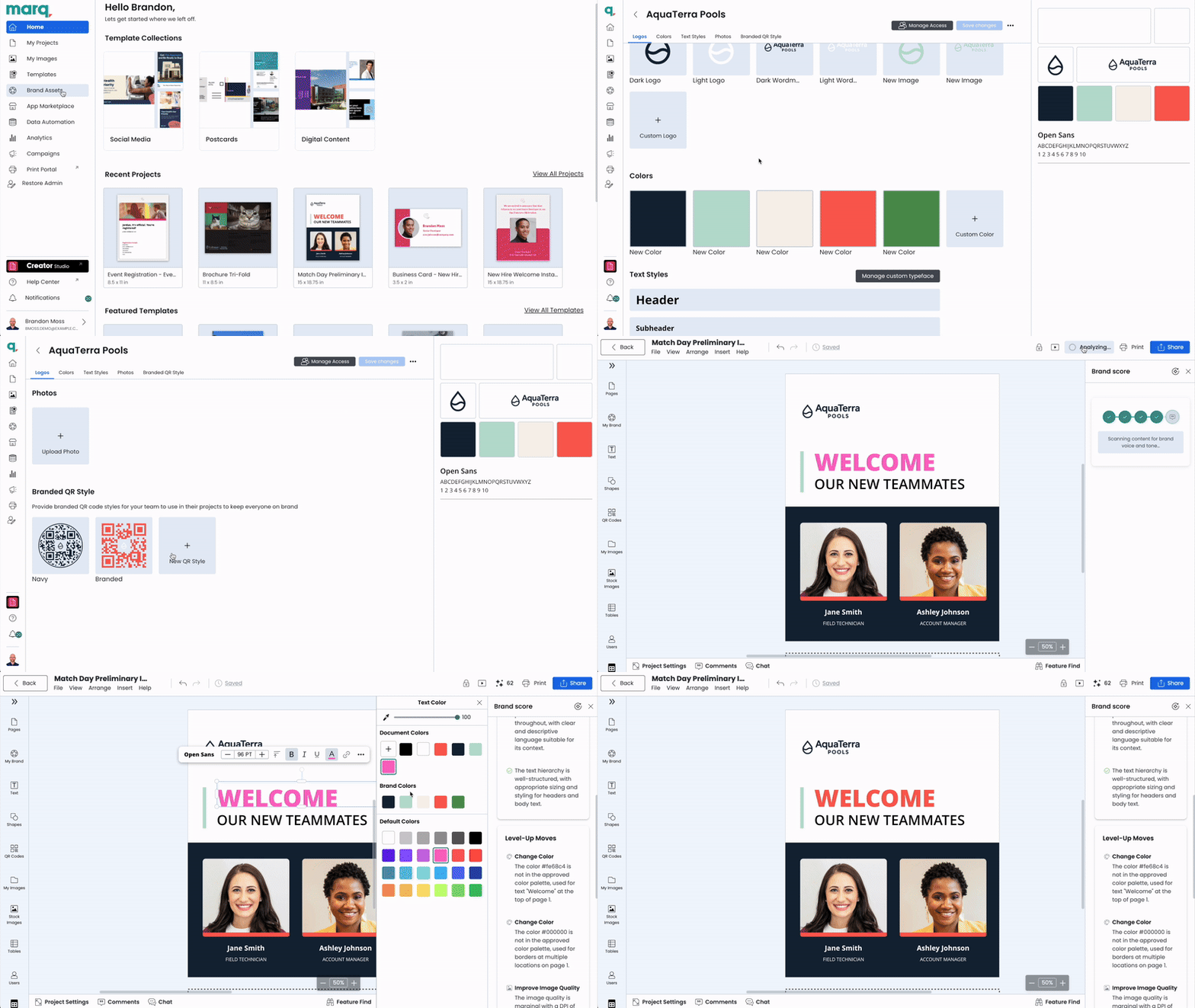
Most organizations rely on a mix of shared folders, brand guidelines PDFs, and trusting that teams will follow them. That model breaks the moment content volume grows.
In regulated industries like financial services or healthcare, an outdated disclaimer on a client-facing document can become a compliance incident. Content that exposes unapproved customer details or outdated legal language carries real legal risk.
Look for platforms where the rules are locked into the template so users can’t edit what they can’t see. Tools that depend on user discipline consistently fail at scale.
Marq integrates governance into its content design process for exactly this scenario.
For regulated industries, this is exactly the type of problem a brand compliance platform is designed to solve.
3. Integration depth with your existing tech stack
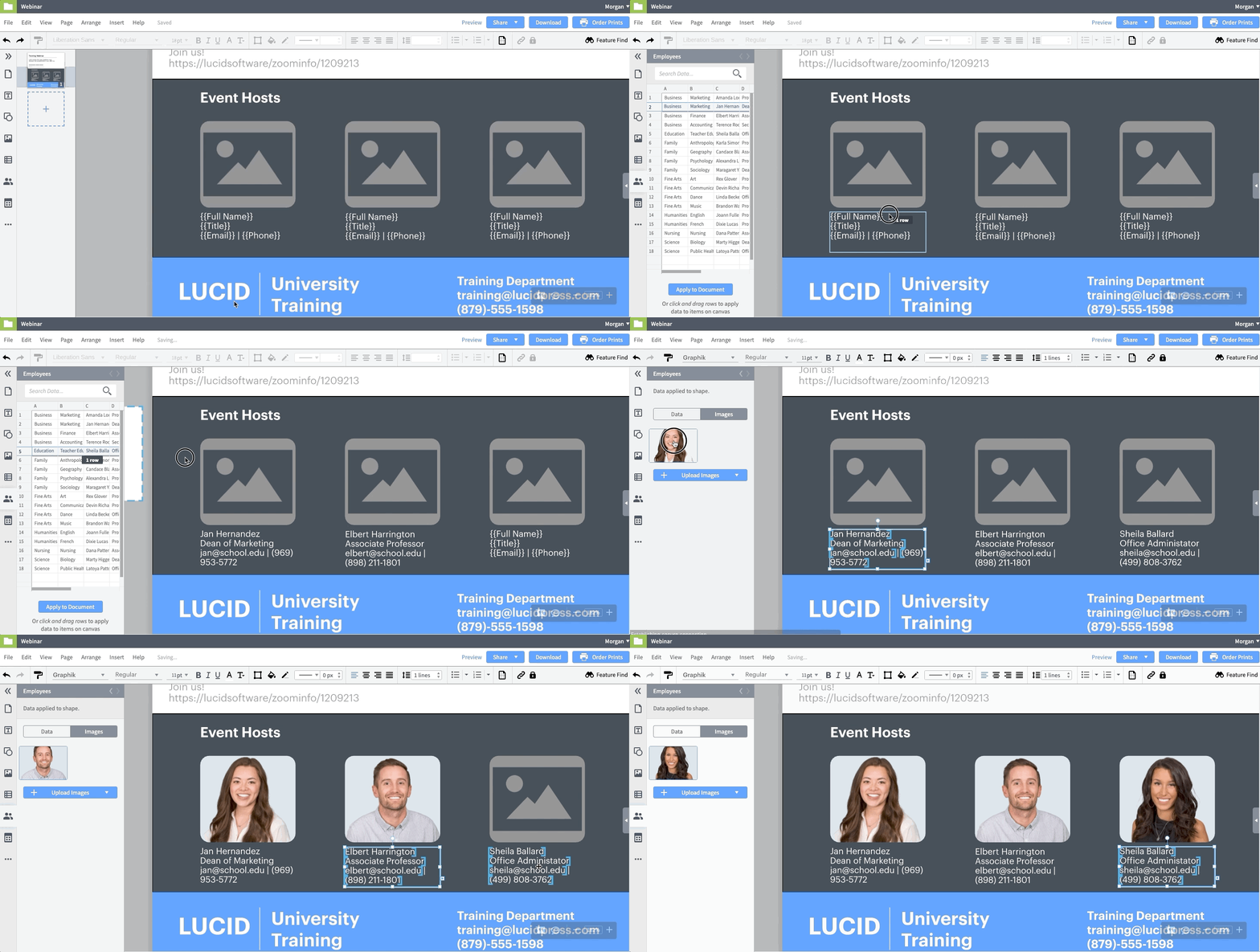
Most marketing VPs and communications directors at mid-market and enterprise companies have the same underlying problem: their brand content exists in five different places, and none of those systems are connected.
Design assets might be in Bynder. Projects run through Asana or Monday.com. Sales needs materials through Salesforce. Regional teams need localized versions in multiple languages. Lots of times, individuals have a personal or department Canva account.
Disconnected tools mean disconnected content. A DAM that no one logs into becomes just storage. Brand content only gets used when it’s where people already are.
Marq’s integration layer is built to collapse that gap. When a deal moves to the Proposal stage in Salesforce, Marq pulls the latest pricing sheet, the most relevant case study, and the approved product visuals. It generates a customized pitch deck without anyone filing a request.
Marq’s integration ecosystem is built for this. The path from “asset in DAM” to “on-brand flyer in the hands of a sales rep” is closed. Content contributors update templates with approved assets directly and the DAM investment starts paying off across the whole organization.
4. Your approval and publishing workflow, end to end
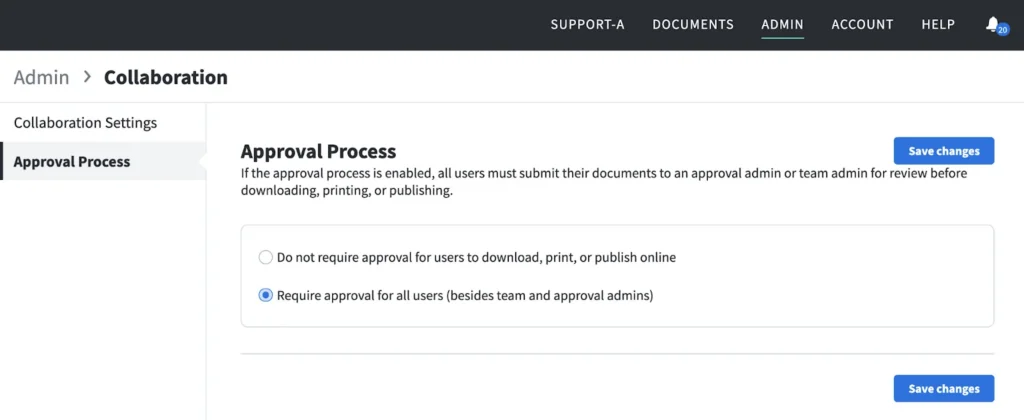
Most creative bottlenecks are approval problems and have nothing to do with design. Content waits in inboxes. Feedback comes in multiple threads. Revisions restart the cycle.
Look for platforms with built-in approval workflows, status tracking, and version control. Frontify and Templafy have this for their respective asset types. Marq builds it into the template creation and publishing cycle for all content types.
→ Learn how Marq handles team management and publishing controls, and content distribution.
5. If AI is creating within brand guardrails, and where it operates freely
Every tool in this guide uses AI. The question is where that AI operates: inside your brand guardrails or outside them.
Before choosing, ask each platform these questions:
- Where does AI generate content – inside locked templates or in an open environment? Open environments produce content that may look and sound professional, but may treat your brand guidelines as optional. Locked templates keep AI within the boundaries you’ve set.
- Does the platform check AI output against your brand standards before it reaches approval? Real-time flagging at the point of creation saves time and helps catch problems before publishing them.
- Can you restrict what AI is allowed to rewrite? Tone, legal copy, and positioning should stay fixed. If they can’t, your brand standards are a suggestion.
For teams producing content at a scale that makes manual review impossible, this is the thing that matters most. Brand-first AI solutions determine if customer-facing teams keep your brand consistent or make inconsistency faster.
Manage your company’s branding easier with Marq AI
Every tool in this guide solves a real problem.
Canva moves fast. Templafy locks down documents. CHILI Publish handles print at volume.
But solving for speed, or compliance, or storage is a different problem than solving for scale: getting every sales rep, franchise owner, field marketer, and regional team to create content that’s actually on-brand, every time, without a design ticket.
That’s the problem Marq is built for. When you solve it consistently, brand management starts being a competitive advantage. If it’s costing your organization right now, it’s worth seeing it in action.