DesignOps frameworks and examples for scaling teams

A design team that once managed a steady workload can struggle when requests start piling up. More requests mean more briefs to review, stakeholders to coordinate, feedback to track, and deadlines to manage. At that point, creative leaders need a clearer way to organize how design work moves from request to delivery.
That is where DesignOps comes in. It brings structure to the people, processes, and systems behind design work, helping teams manage demand, collaborate across functions, and measure what they deliver.
This guide explains why design operations get harder as teams scale, the four areas that make up a strong DesignOps practice, the frameworks that help put those practices into place, and how real teams have improved their workflows.
Why DesignOps becomes more difficult as design teams scale
Every new office, campus, product line, or channel adds requests and handoffs. Headcount on the design team rarely grows at the same pace. These are five common problems
1. Requests grow faster than the team
Imagine a brokerage with 40 offices that hires 15 new agents every quarter. Each agent needs business cards, listing flyers, and social headers in their first month. The design team is still the same three people it was last year.
This gap shows up in survey data too. In a sample of 206 enterprise creative leaders that Superside surveyed, more than three-quarters said creative demand is higher than their capacity to deliver, and two in five said their team is understaffed. When requests exceed the team’s capacity, requesters wait weeks for design work and start building their own versions.
2. Repeat work crowds out the work that matters
A designer spends Tuesday swapping dates on six event posters and resizing one banner for four social channels. The annual campaign concept, due Friday, gets two hours of attention.
In the same Superside sample, 70% of leaders said many of their most talented designers work on tasks below their skill level. A Director of Creative at a large health system described it plainly in Marq’s customer research:
“A lot of things that are taking the most of our time are kind of the least important.“
– Director of Creative, large health system
The cost is the strategic work that slips: the rebrand rollout, the enrollment campaign, the launch that needed a real concept.
3. Everything arrives marked urgent
Sales needs the trade show one-pager by tomorrow. The VP wants the board deck refreshed today. Admissions needs open house signage this week.
In the Superside sample, 55% of projects were marked high priority on average, and respondents said executive pressure was involved 35% of the time.
When more than half the queue is urgent, nobody can sequence the work, so teams prioritize requests from the people who escalate most. In the same sample, 76% of leaders said they and their teams felt burned out by their workload over the past year.
4. Approvals and handoffs multiply
An insurance carrier’s marketing team updates a product flyer. The regional manager reviews it, compliance checks the state-specific disclaimer, legal reviews the rate language, and then the flyer goes back to design for a fourth round.
Each new team adds another reviewer, and each reviewer adds a round of edits. A two-day job turns into a two-week job, and nobody can say who owns the final sign-off. Teams also lose track of which version is current, so reviewers comment on files that changed two rounds ago.
5. The brand becomes inconsistent across teams and locations
A sales rep at a manufacturing company needs a spec sheet for a distributor meeting that afternoon. If the design team cannot complete the request in time, the rep might update an old file or recreate the material in another tool. They open a 2022 file from their desktop, type over the old pricing, and send it. The logo is outdated, and one listed product is discontinued.
People outside the design team may understand the basic brand rules but lack access to current, approved materials. Without a required review step, inaccurate or off-brand content can reach customers before the brand team sees it.
Components of DesignOps
These components help teams manage requests, coordinate work, and deliver consistent results as demand grows.
| Component | What it covers | Example of the output |
| Design process | How a request moves from intake to delivery | An intake form with request types and turnaround targets |
| Team coordination | Who owns what and how design works with other teams | A weekly planning meeting with marketing and a named approver per asset type |
| Design tools | The software the team and its requesters use | A shared list of approved tools, licenses, and file locations |
| Design culture | Shared standards and how the team shows its value | Brand guidelines people use and a monthly report to leadership |
Design process
For each request, the process defines the next step. It includes the intake form, the brief, the review stages, and a clear definition of “done.”
A hospital’s marketing team, for example, can require every request to name the audience, the channel, the deadline, and the existing file designers should use as a starting point. That one form answers the questions designers would otherwise email back about before they can start.
Team coordination
Coordination is how designers, marketers, sales teams, and compliance reviewers work together without duplicating or blocking each other’s work. It covers planning meetings, design critiques, handoffs, and who has the final say on each type of asset.
At a university, a monthly planning call between the central creative team and each school’s communications lead lets both sides see big launches coming.
Design tools
DesignOps tools fall into a few groups: design software (InDesign, Figma), project and request tracking (Asana, Jira, Wrike), proofing and review, asset storage (MediaValet), and brand templating (Marq). The DesignOps job is choosing what each team uses, managing licenses, and keeping files where people can find them.
The common mistake is adding a new tool for every new problem. Start with the problem from your request audit, then pick the tool. Compare options in our roundup of the best creative automation tools.
Design culture
Culture covers the standards your team sets, how you onboard new designers, and how you show leadership what design contributes. Brand guidelines belong here, in a format people will open and use.
Culture also includes measuring impact. A quarterly report on turnaround times and campaign results shows leadership what design delivers, in numbers they already track.
5 DesignOps frameworks for scaling creative operations
These five frameworks cut repeat work, make handoffs clear, and make creative production predictable enough to plan around. Each one works with or without a dedicated DesignOps role.
| Framework | Problem it addresses | Owner |
| Tiered request intake | Every request waits in one queue | Creative director |
| Locked templates for repeat work | Designers spend days on small edits | Senior designer |
| Review paths by risk level | Every asset gets the same long review | Creative director and compliance lead |
| One home for approved assets | Old logos and photos keep circulating | Brand manager |
| Monthly capacity and impact report | Leadership can’t see what design delivers | Creative director or DesignOps lead |
1. Tiered request intake
Sort every request by how much design skill it needs before anyone starts work. Start with three tiers:
- Repeat: Same layout, new details. An open house flyer with a new address, an event poster with a new date, a business card for a new hire. Target: same day, handled by the requester.
- Adapt: An existing design in a new size, channel, or language. A campaign banner resized for LinkedIn, a brochure translated into Spanish. Target: two to five days, handled by a production designer.
- New: A concept nobody has made before. A campaign, a rebrand, a new product launch. Scheduled in planning and handled by senior designers.
To set it up, export the last 90 days of tickets and tag each one by tier. The split tells you where your designers’ hours go. Then add a required question to the intake form: “Has this been made before? Link the file.”

Reduce repetitive design requests with Marq
Give requesters a faster way to handle routine design updates while your designers focus on work that needs their expertise.
2. Governed templates for repeating work
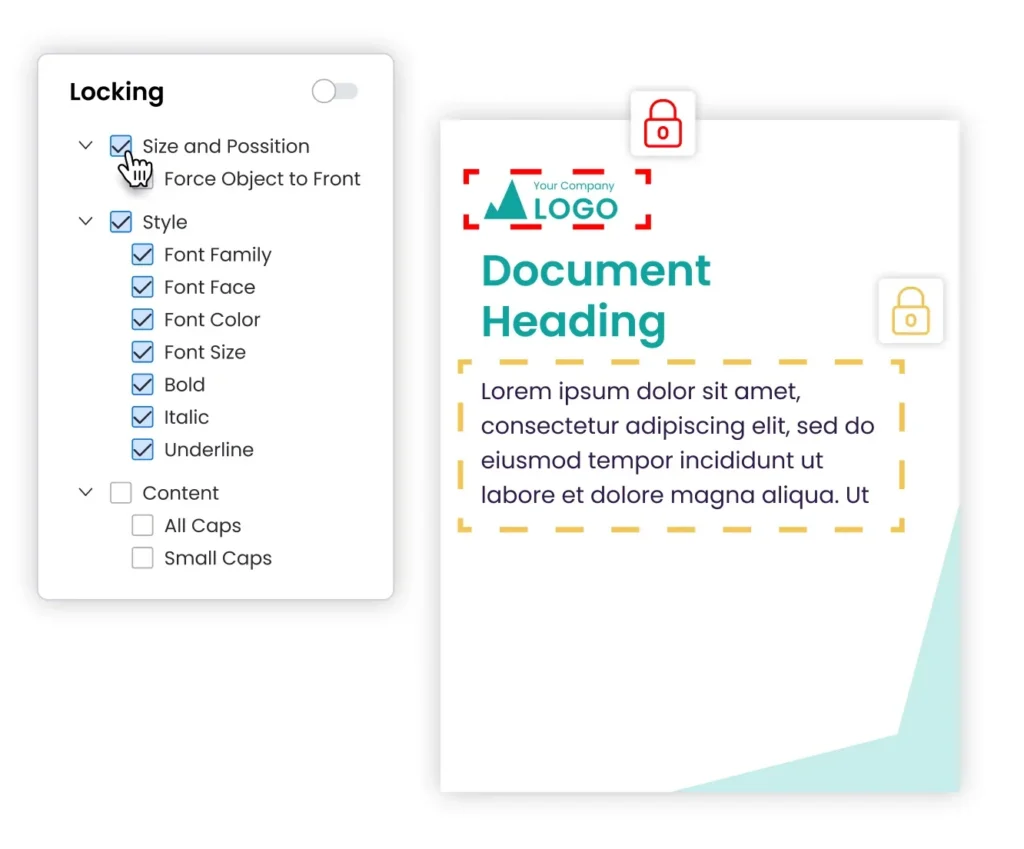
Once you know your repeat requests, turn the top ones into templates that people outside the design team can edit safely. Designers build the master file, lock the logo, colors, fonts, and legal copy, and leave only the headline, date, photo, and contact fields open.
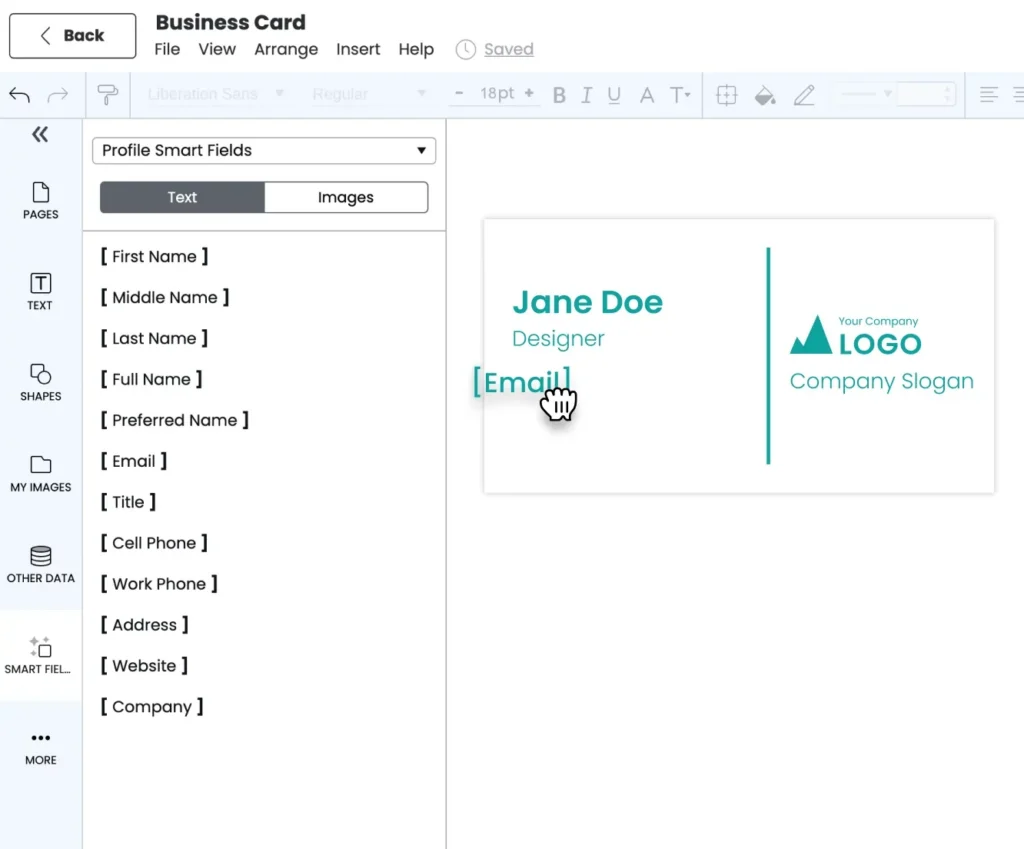
Personalization fields can fill in user-specific details. An insurance agent opens a flyer template, and the agent’s name, license number, and state-specific disclaimer are populated from the agent’s profile. The agent edits the offer, and the other fields remain unchanged.
In Marq, designers build these templates in InDesign, upload them, set locks, and add smart fields that fill in details by user, office, or department. Purdue University’s senior graphic designer described why that matters for the design team:
“Because we can design and upload the templates in InDesign, Marq is a natural extension of what we do. We’re able to repurpose our completed project layouts into templates, and it’s easy for our campus partners to access and edit the files, as well as download them in whatever format they need for the channel they’re using.“
– Cheryl Glotzbach, Senior Graphic Designer, Purdue University
3. Review paths by risk level
Give each tier its own review path, so reviewers can process routine flyer date changes without delaying a campaign launch.
| Tier | Who reviews | Target time |
| Repeat (locked template) | No design review; compliance pre-approves the locked copy once | Same day |
| Adapt | One designer review | One to two days |
| New | Design, brand, legal, and compliance as needed | Set in the project plan |
A financial services firm, for example, can have compliance approve the disclosure block inside each template once. Advisors can’t edit that block, so compliance reviews each template instead of every flyer an advisor sends.
Name one final approver per asset type and write the path down. Marq’s approval workflows route a finished piece to the right reviewer before anyone can publish it. Our creative process templates include review checklists you can adapt.
4. One home for approved assets
A regional manager emails the logo she saved in 2021. A sales rep pulls a product photo from an old slide deck. Both files reach customers.
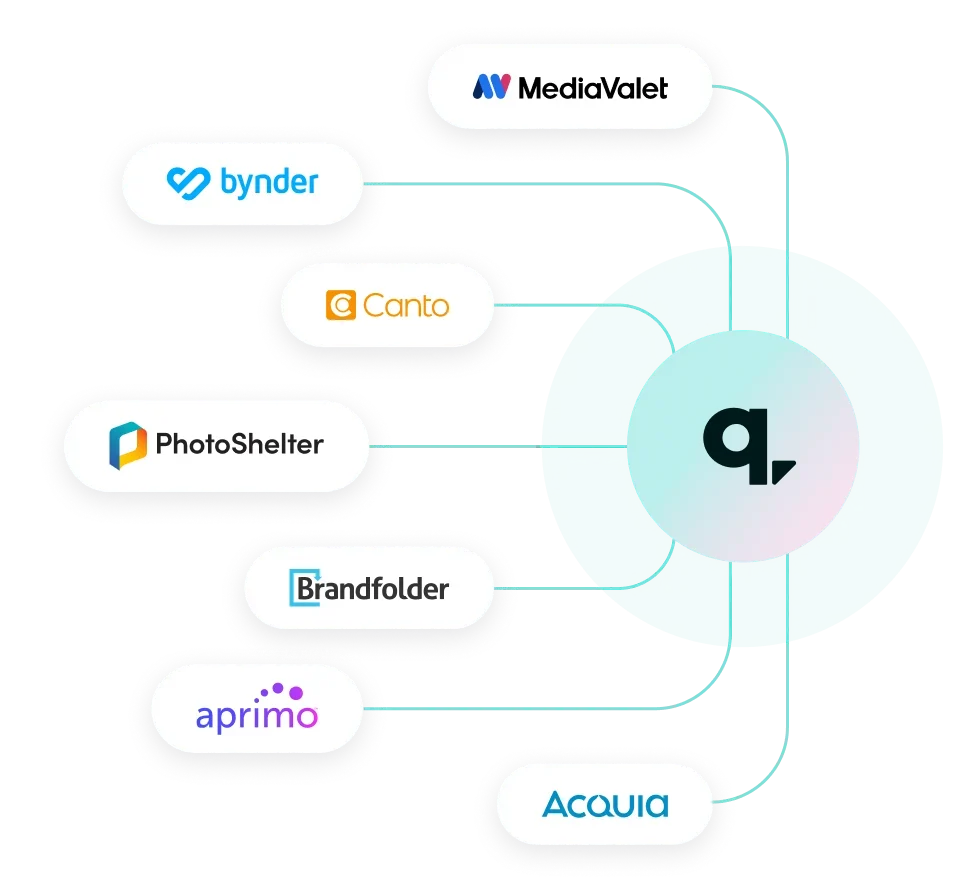
Pick one place where current logos, photos, and fonts live, delete or archive old versions, and name an owner who keeps it current. Your organization may already store these files in a digital asset management system (DAM). Marq connects templates to DAMs such as Brandfolder and Bynder, so templates use the current logo.
5. Monthly capacity and impact report
Track a few numbers every month and share them with your VP or CMO:
- Request volume by tier: shows where demand comes from
- Median turnaround by tier: shows whether requesters wait less
- Share of repeat requests handled outside the design team: shows how much capacity you got back
- Designer hours on new work: shows time spent on campaigns and brand projects
Use these figures to support staffing and budget requests. Purdue University’s marketing team, for example, reported running up to 129 active brand-building projects at a time after campus partners started making their own materials.
Examples of DesignOps workflows in practice
These three teams sorted their repeat work, moved it into locked templates, and left designers more time for work that requires design expertise. Each one is a Marq customer.
Johns Hopkins University: a team of four serving thousands of staff
Johns Hopkins has nine schools across four campuses. Its creative strategy team had four people handling requests from thousands of employees, and staff waited three to four weeks for content during busy periods. Staff who couldn’t wait hired freelancers or made their own materials.
The team built templates for collateral it produced over and over, then used smart fields to load the correct logo, fonts, and images for each school. Departments such as alumni relations and athletics got their own template collections. Lead time on content dropped from as long as four weeks to one day. As the Director of Creative Strategy put it:
“Because of Marq, we’re able to maximize the design resources we have. Our designers can focus on setting up the initial templates for others to use, and then get on with the design work they are truly skilled to do.”
– Abby Jackson, Director of Creative Strategy, Johns Hopkins University
PT Solutions: 550 clinics and one creative team
PT Solutions is a physical therapy provider with 4,500 employees and 550 locations in 25 states. The creative team handled more than 300 requests a month, many of them repeat jobs, and sales reps waited two to four weeks for a flyer. Acquired clinics also needed dual-branded materials during each transition.
The team locked core brand elements in Marq templates and moved logos, photos, and style guides into branded MediaValet portals connected to the Marq editor. Regional and clinic teams now self-serve more than 300 projects a month, and reps produce flyers the same day. The Senior Manager of Creative Solutions described the change for sales:
“Now, when our sales team needs something, they don’t have to wait. They can open a template, drop in the details, and get it out the door the same day.”
– Malia Hostetler, Senior Manager of Creative Solutions, PT Solutions
@properties | Christie’s International Real Estate: templates in minutes for 3,500 agents
@properties | Christie’s International Real Estate supports more than 3,500 agents across 44 offices in four states. Its marketing team used an outside template provider, and a single template took four to six weeks to build.
The team now uploads InDesign files to Marq, locks the brand elements, and publishes templates to agents within minutes. Agents create postcards, brochures, and social posts, then send them to print, publish them on the web, or share them on social media. The company’s Chief Marketing Officer explained the shift:
“Instead of waiting weeks to have templates created with other vendors, we can simply take an inDesign file, upload it into Marq, lock certain branding elements down, and have the template ready for agents and affiliates to use within a few minutes.“
– Chief Marketing Officer, @properties | Christie’s International Real Estate
Help your team create on-brand content with Marq
Marq supports the production side of DesignOps. It moves repetitive design requests out of your designers’ queue, so they can spend their hours on campaigns, brand work, and other projects that need their skill. Team structure, hiring, research, and priorities stay with you.
Here is what Marq gives your team:
- Lockable templates: Designers lock logos, colors, fonts, and legal copy, and open only the fields others should edit.
- InDesign-to-template workflow: Designers keep working in InDesign and upload finished layouts as templates.
- Smart Fields: Creative automation populates names, contact details, logos, and disclaimers based on the user’s profile, location, or department. Marq calls these personalized fields Smart Fields.
3. Central approved assets: Current brand files sit in one place, with connections to the DAM you already use.
4. Approval workflows: Each workflow routes a finished piece to its designated reviewer before publication.
Ready to see how Marq fits your workflow? Book a demo.
FAQs
What is DesignOps?
DesignOps, short for design operations, is the set of practices that shape how a design team works together, gets work done, and shows its impact. It covers request intake, review steps, tools, team rituals, and reporting. Teams of any size can use these practices, with or without a dedicated DesignOps hire.
What are the pillars of DesignOps?
Three pillars come up most often: how the team works together, how it gets work done, and how its work creates impact. Nielsen Norman Group organizes DesignOps around these three areas. Some teams split tools and culture into separate pillars to give each a clear owner.
What is the role of a DesignOps manager?
A DesignOps manager runs the operations around design work: intake, planning, tool and license management, review processes, onboarding, and reporting to leadership. The goal is to reduce designers’ administrative work so they can focus on design. On smaller teams, a creative director or senior designer can cover these duties part-time.